


Description
Download File Renamer to Batch Rename Multiple Files – Free, Secure & Powerful Tool for Windows
Tired of manually renaming dozens of files one by one? File Renamer to Batch Rename Multiple Files is a free, lightweight, and highly efficient software designed specifically for Windows users who need to manage large volumes of files quickly and accurately. Developed by HotHotSoftwrae, this powerful tool allows you to rename multiple files at once using customizable rules, patterns, and numbering options. Whether you're organizing photos, renaming documents, or preparing media files for a project, File Renamer streamlines the entire process. With support for Windows 11 and above, this app ensures compatibility with modern systems while maintaining a clean, intuitive interface. The latest version, 9.1.3, includes performance improvements and enhanced stability. Best of all? It’s completely free to download and use—no hidden costs or watermarks. If you're looking for a reliable way to simplify file management, this is the tool you’ve been waiting for.
Key Features of File Renamer to Batch Rename Multiple Files
File Renamer to Batch Rename Multiple Files stands out in the crowded file management space thanks to its robust feature set and user-centric design. One of its most powerful tools is the batch renaming engine, which allows you to apply the same renaming rule across dozens or even hundreds of files simultaneously. Whether you’re working with image files, PDFs, audio clips, or video files, the software supports all common file types and extensions. The interface is clean and straightforward, making it accessible even for beginners.
Another standout feature is the custom naming pattern builder. You can insert dynamic elements like date stamps, sequential numbers, file metadata (such as title or camera model), and even text replacements. For example, you can rename a folder of vacation photos from “IMG_001.jpg” to “Vacation_2024_01.jpg” with just a few clicks. The tool also supports regular expressions for advanced users who need precise control over naming logic.
Additional features include preview mode (so you can see changes before applying them), undo functionality (in case you make a mistake), and backup options to preserve original files. The software also lets you rename folders and subfolders, making it ideal for restructuring entire project directories. With support for drag-and-drop, multiple selection, and customizable templates, File Renamer is a must-have for anyone serious about digital organization. All features are available in the free version, making it an excellent value for users on a budget.
How to Install and Use File Renamer for Efficient File Management
Installing File Renamer to Batch Rename Multiple Files is quick and hassle-free. Since it’s a standalone application, there’s no need for complex setup procedures. Simply visit the official download page, click the “Download” button, and save the installer file to your computer. Once downloaded, run the executable and follow the on-screen prompts—no additional software or dependencies are required.
After installation, launch the app. The main window presents a simple drag-and-drop area where you can import your files or navigate through folders using the built-in file browser. Select the files you want to rename, then head to the Renaming Rules panel. Here, you can choose from several presets like “Add Prefix,” “Replace Text,” “Insert Number,” or “Rename by Date.” For more control, use the Advanced Mode to build custom patterns using placeholders like {number}, {date}, or {originalname}.
Before confirming, always use the Preview function to check how your files will be renamed. This prevents accidental errors and gives you peace of mind. Once satisfied, click “Rename” to apply the changes. The tool processes files quickly, even in large batches, and provides a summary report at the end. You can also save your renaming templates for future use—perfect for recurring tasks like organizing monthly reports or backing up media.
For best results, always back up your original files before renaming. While File Renamer is secure and reliable, having a backup ensures you can recover if something goes wrong. The software runs quietly in the background and doesn’t consume excessive system resources, making it ideal for older or low-end Windows machines.
Compatibility and System Requirements
File Renamer to Batch Rename Multiple Files is designed exclusively for Windows operating systems, with full compatibility for Windows 11 and above. It’s optimized for both 64-bit and 32-bit versions of the OS, ensuring broad accessibility across modern PCs. The app does not require administrator privileges to run, so you can use it on work or school computers without needing special permissions.
System requirements are modest, making it suitable for a wide range of devices. You’ll need at least 500 MB of free disk space and 1 GB of RAM to run the software smoothly. It supports all major file formats, including JPG, PNG, MP4, AVI, PDF, DOCX, and more. The interface is responsive and works well on both high-resolution monitors and standard displays.
While the software is currently only available for Windows, the developers have hinted at future releases for Mac and Linux. For now, Windows users have a powerful, free tool at their disposal. The app is distributed through trusted platforms like Softonic, ensuring a secure download experience. Regular updates are released to fix bugs, improve performance, and add new features—version 9.1.3 includes enhanced file scanning and faster processing speeds.
It’s worth noting that File Renamer does not require an internet connection to function, which enhances privacy and security. Your files remain on your local device at all times, and no data is uploaded to external servers. This makes it a trustworthy choice for sensitive or personal file management tasks.
Pros and Cons: Is File Renamer Right for You?
- Pros:
- Free to download and use with no hidden costs
- Supports batch renaming of hundreds of files at once
- Intuitive, clean interface suitable for beginners
- Advanced features like regex, metadata extraction, and templates
- Preview mode and undo option for safe renaming
- Lightweight and fast, with minimal system impact
- Backs up original files before renaming (optional)
- Regular updates and strong developer support
- Cons:
- Currently only available for Windows (no Mac or Linux version)
- Limited customization for non-technical users (though advanced users will appreciate it)
- No built-in cloud sync or sharing features
- Minimal documentation or tutorial videos (though the UI is self-explanatory)
Frequently Asked Questions (FAQ)
- Can I rename files with the same name in different folders?
-
Yes, File Renamer allows you to select files from multiple folders and rename them in bulk. Just drag and drop all desired files into the app, and apply your renaming rules across the entire selection.
- Is it safe to use File Renamer on important files?
-
Absolutely. The software includes a preview function so you can see changes before applying them. You can also enable backup mode to preserve original files. Many users rely on it for critical data organization without issues.
- Can I use custom numbering sequences?
-
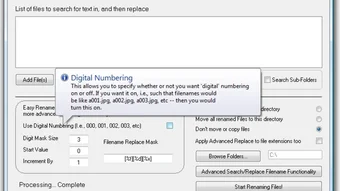
Yes, you can set custom starting numbers, padding (e.g., 001, 002), and step values. This is especially useful for photo albums, video series, or document sets that need sequential numbering.
- Does File Renamer support file metadata?
-
Yes, the app can extract and use metadata such as creation date, camera model, title, and author. This is great for organizing media files based on real-world information.
- How often is the software updated?
-
The developers release updates regularly—version 9.1.3 was published in June 2024. These updates improve performance, fix bugs, and sometimes add new features based on user feedback.
Final Verdict: A Must-Have Tool for Windows Users
If you're looking for a reliable, free, and secure way to manage your digital files, File Renamer to Batch Rename Multiple Files is an excellent choice. Its combination of simplicity and power makes it suitable for both casual users and professionals. Whether you're a student organizing assignments, a photographer sorting images, or a business user managing reports, this tool saves time and reduces errors.
With its intuitive interface, advanced renaming rules, and strong safety features, it’s one of the best free file management tools available for Windows. The fact that it’s completely free, lightweight, and regularly updated adds to its appeal. While it’s currently limited to Windows, the developers’ commitment to improvement suggests future expansion is likely.
Don’t waste time renaming files manually—download File Renamer today and experience the power of batch renaming. It’s fast, secure, and built for real-world use. Click the download button now and take control of your digital clutter.
Guides & Tutorials for File Renamer to Batch Rename Multiple Files
How to install File Renamer to Batch Rename Multiple Files
- Click the Preview / Download button above.
- Once redirected, accept the terms and click Install.
- Wait for the File Renamer to Batch Rename Multiple Files download to finish on your device.
How to use File Renamer to Batch Rename Multiple Files
This software is primarily used for its core features described above. Open the app after installation to explore its capabilities.
User Reviews for File Renamer to Batch Rename Multiple Files 0
No reviews found





